
The purpose of this project is to show how to use WMI and Grafana to build an Active Directory dashboard.
The Python script uses the linux wmic client you can find here
The software requirements are the following :
- a debian / ubuntu system (you can choose another os but prefer those ones if you need help :))
- influxdb database
- grafana
- python (for me I have the version 2.7.3)
- InfluxDBClient for python
- wmic tool
In this example, you will have to create one influxdb database called admon
The first step, is to use a user account only member of “Domain Users” to query WMI : for us, I will use the username called wmiusername
On each domain controller, you will have to add this user to the WMI security :
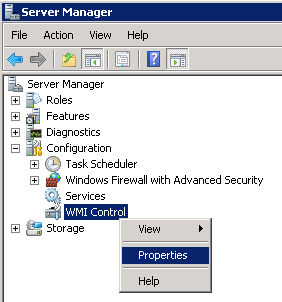
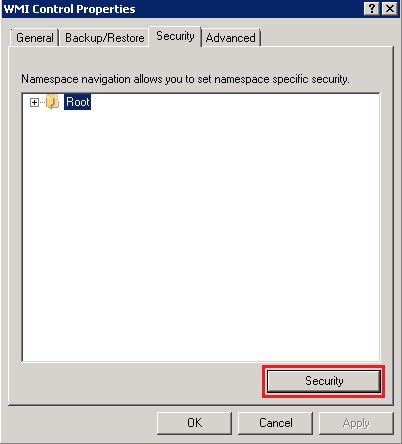
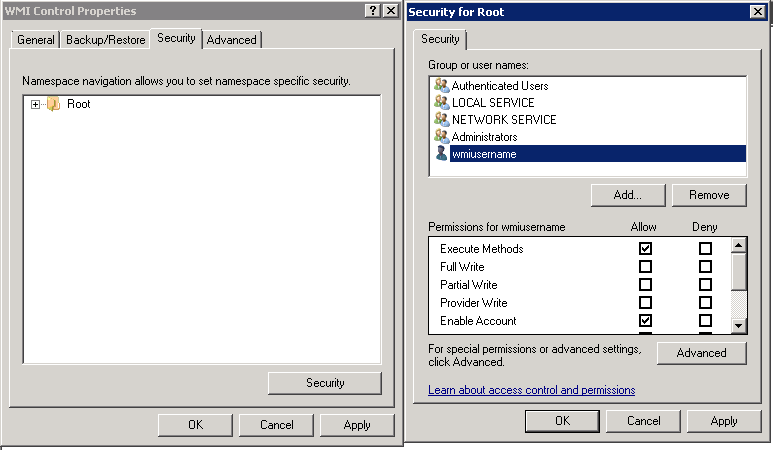
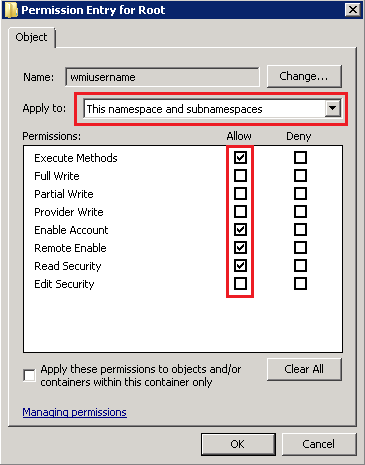
When it is done, restart the WMI service.
Configure the config file below according to your environnement
[config]
FOREST=forestname.net
NSZONE=_msdcs
DNSRECTYPE=NS
WMIC=/usr/bin/wmic
WMIUSR=wmiusername
WMIPWD=wmipassword
DBUSER=dbusername
DBPWD=dnpassword
DBNAME=admon
DBIP=10.1.2.3


[mon---1]
WMICLASS=Win32_PerfFormattedData_PerfOS_Processor
WMIINSTANCE=_total
WMIOBJECT=PercentIdleTime

[mon---2]
WMICLASS=Win32_PerfFormattedData_PerfOS_Memory
WMIINSTANCE=
WMIOBJECT=PagesOutputPersec

[mon---3]
WMICLASS=Win32_PerfFormattedData_PerfDisk_LogicalDisk
WMIINSTANCE=_total
WMIOBJECT=PercentIdleTime

[mon---4]
WMICLASS=Win32_PerfFormattedData_DirectoryServices_DirectoryServices
WMIINSTANCE=
WMIOBJECT=DSDirectoryReadsPersec

[mon---5]
WMICLASS=Win32_PerfFormattedData_DirectoryServices_DirectoryServices
WMIINSTANCE=
WMIOBJECT=DSDirectorySearchesPersec

[mon---6]
WMICLASS=Win32_PerfFormattedData_DirectoryServices_DirectoryServices
WMIINSTANCE=
WMIOBJECT=DSDirectoryWritesPersec

[mon---7]
WMICLASS=Win32_PerfFormattedData_DNS_DNS
WMIINSTANCE=
WMIOBJECT=UDPQueryReceivedPersec

[mon---8]
WMICLASS=Win32_PerfFormattedData_DNS_DNS
WMIINSTANCE=
WMIOBJECT=TCPQueryReceivedPersec

[mon---9]
WMICLASS=Win32_PerfFormattedData_DNS_DNS
WMIINSTANCE=
WMIOBJECT=RecursiveQueriesPersec

[mon---10]
WMICLASS=Win32_PerfFormattedData_PerfDisk_LogicalDisk
WMIINSTANCE=C:
WMIOBJECT=PercentFreeSpace

[mon---11]
WMICLASS=Win32_PerfFormattedData_PerfDisk_LogicalDisk
WMIINSTANCE=C:
WMIOBJECT=FreeMegabytes

[mon---12]
WMICLASS=Win32_PerfFormattedData_Lsa_SecuritySystemWideStatistics
WMIINSTANCE=
WMIOBJECT=NTLMAuthentications

[mon---13]
WMICLASS=Win32_PerfFormattedData_Lsa_SecuritySystemWideStatistics
WMIINSTANCE=
WMIOBJECT=KerberosAuthentications

[mon---14]
WMICLASS=Win32_PerfFormattedData_Lsa_SecuritySystemWideStatistics
WMIINSTANCE=
WMIOBJECT=KDCTGSRequests

[mon---15]
WMICLASS=Win32_PerfFormattedData_PerfNet_Server
WMIINSTANCE=
WMIOBJECT=ServerSessions

[mon---16]
WMICLASS=Win32_PerfFormattedData_PerfNet_Server
WMIINSTANCE=
WMIOBJECT=ErrorsLogon

[mon---17]
WMICLASS=Win32_PerfFormattedData_NTDS_NTDS
WMIINSTANCE=
WMIOBJECT=LDAPBindTime
Copy the python script to your linux box and run it
#!/usr/bin/python

from __future__ import division
import socket
import dns.resolver
import ConfigParser
import os
import subprocess
import threading
import re
import time
from influxdb import InfluxDBClient

config = ConfigParser.RawConfigParser()
config.read(os.path.dirname(os.path.realpath(__file__))+'/config.ini')
forestname = config.get('config', 'FOREST')
nszone = config.get('config', 'NSZONE')
recordtype = config.get('config', 'DNSRECTYPE')
wmic = config.get('config', 'WMIC')
wmiusr = config.get('config', 'WMIUSR')
wmipwd = config.get('config', 'WMIPWD')
dbuser = config.get('config', 'DBUSER')
dbpwd = config.get('config', 'DBPWD')
dbname = config.get('config', 'DBNAME')
dbip = config.get('config', 'DBIP')
sct = re.compile("^mon---", re.IGNORECASE)
client = InfluxDBClient(dbip, 8096, dbuser, dbpwd, dbname)

monsct = filter(sct.search, config.sections())

forestzonefqdn = nszone + '.' + forestname
dclist = []

threadLimiter = threading.BoundedSemaphore(value=200)

class myThread (threading.Thread):
	def __init__(self, threadID, name, wmicmd, wmimoninfo):
		threading.Thread.__init__(self)
		self.threadID = threadID
		self.name = name
		self.wmicmd = wmicmd
		self.wmimoninfo = wmimoninfo
	def run(self):
		threadLimiter.acquire()
		try:
				print_adrepl(self.name, self.wmicmd, self.wmimoninfo )
		finally:
				threadLimiter.release()

def print_adrepl(threadName, wmicmd, wmimoninfo):
		timeserie = threadName + wmimoninfo
		proc = subprocess.Popen(wmicmd,stdout=subprocess.PIPE, stderr=subprocess.PIPE)
		errorlines = filter(lambda x:len(x)>0,(line.strip() for line in proc.stderr))
		if errorlines :
				t = 1
		outputlines = filter(lambda x:len(x)>0,(line.strip() for line in proc.stdout))
		if "NumConsecutiveSyncFailures_MSAD_ReplNeighbor" in wmimoninfo:
				oulen = len(outputlines)
				fsynctot = 0
				for line in outputlines[2:]:
						fsyncsgl = int(line.split(";")[1])
						fsynctot += fsyncsgl
				fsync = fsynctot / oulen

				json_body = [{
								"points": [
									[int(time.time()), float(fsync)]
								],
								"name": timeserie,
								"columns": ["time", "value"]
							}]
				client.write_points(json_body, time_precision='s')

		else:
				if len(outputlines)>2 :
						json_body = [{
										"points": [
											[int(time.time()), int(re.findall(r'\b\d+\b', outputlines[2:][0])[0])]
										],
										"name": timeserie,
										"columns": ["time", "value"]
									}]
						client.write_points(json_body, time_precision='s')

threads = []

cred = '-U'+forestname+'/'+wmiusr+'%'+wmipwd
wmidstip = "//"+socket.gethostbyname(str(forestname))
wmiselect = "select * from MSAD_NamingContext"
wminamespace = "--namespace=Root/MicrosoftActiveDirectory"
wmidelimiter = "--delimiter=;"
wmicmd = [wmic , cred , wmidstip  , wmiselect , wminamespace , wmidelimiter ]

while 1:
		i = 1
		for rdata in dns.resolver.query(forestzonefqdn, recordtype) :
				print str(rdata.target)
				dcip = socket.gethostbyname(str(rdata.target))
				dcdomain = str(rdata.target).split('.',1)[1]
				dclist.append([str(rdata.target) , dcdomain , dcip])
				wmidstip = "//" + dcip
				wmiselect = "select NumConsecutiveSyncFailures,sourceDsaCN,TimeOfLastSyncAttempt,TimeOfLastSyncSuccess from MSAD_ReplNeighbor"
				wmicmd = [wmic , cred , wmidstip  , wmiselect , wminamespace , wmidelimiter ]
				wmimoninfo = "NumConsecutiveSyncFailures_MSAD_ReplNeighbor"
				thread = myThread(i, str(rdata.target), wmicmd, wmimoninfo )
				thread.start()
				threads.append(thread)
				i += 1

				for monitor in monsct :
						if config.get(monitor, 'WMIINSTANCE') != "" :
								wmiinstance = " where name='"+config.get(monitor, 'WMIINSTANCE')+"'"
						else :
								wmiinstance = " "

						wmiselect = "select " + config.get(monitor, 'WMIOBJECT') + " from " + config.get(monitor, 'WMICLASS') + wmiinstance
						wmidelimiter = "--delimiter=;"
						wmicmd = [wmic , cred , wmidstip  , wmiselect , wmidelimiter ]
						wmimoninfo = config.get(monitor, 'WMICLASS')+"_"+config.get(monitor, 'WMIOBJECT')
						thread = myThread(i, str(rdata.target), wmicmd, wmimoninfo )
						thread.start()
						threads.append(thread)
						i += 1

						#limitation on x86 system
						while threading.active_count() > 200 :
								time.sleep(1)


		for t in threads:
				t.join()
		print "Exiting Main Thread"
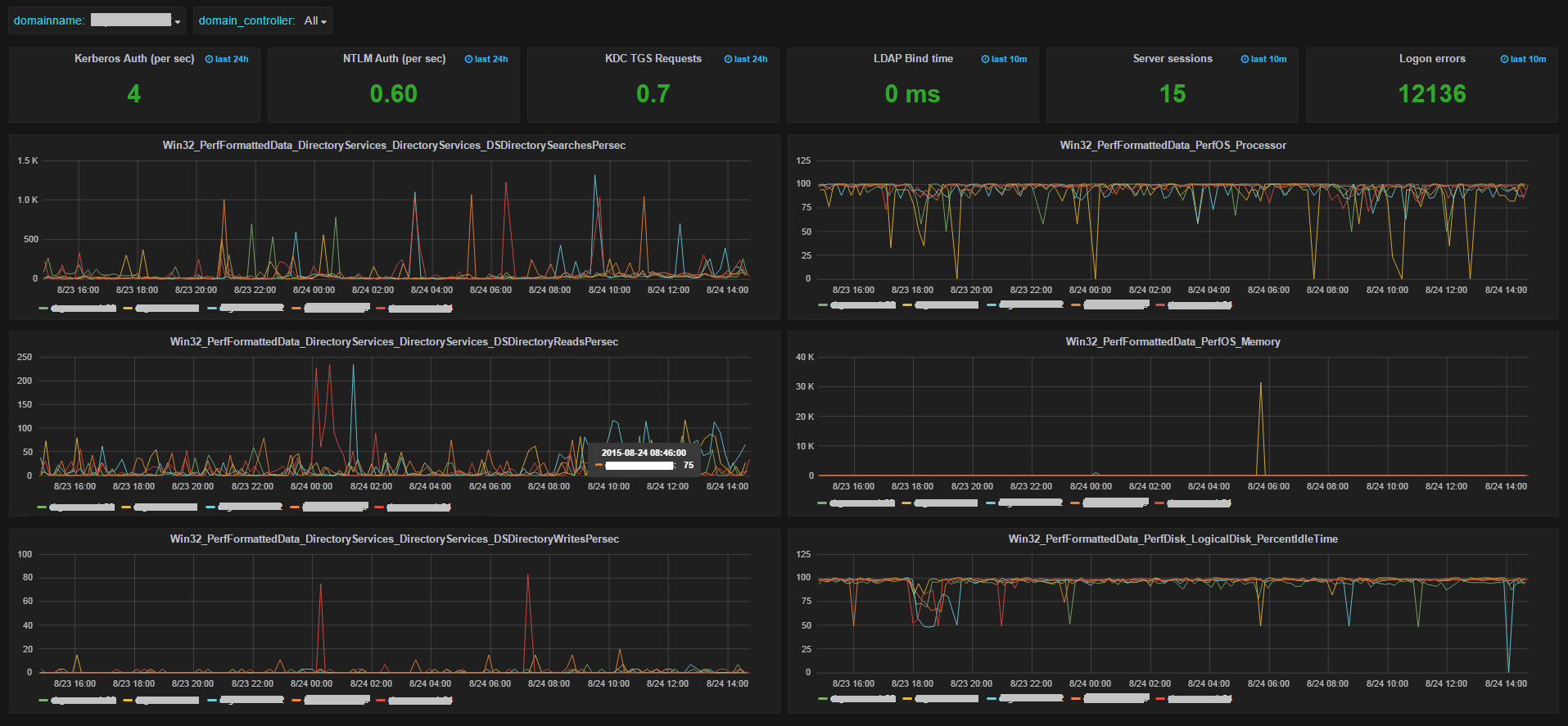
You can use the following AD_Grafana_Dashboard to import in Grafana to get a dashboard like this :
You can download the archive that contains all required files admon
Do not hesitate to contact me if you have any questions
My Powershell script categories
- Active Directory
- Cluster
- Database
- Exchange
- Files and folders
- Hardware
- Network
- Operating System
- PKI
- SCCM
- Service and process
- Tips
- VMWare
This looks really cool but how did you get this all set up on the server? As someone who is fairly new to linux, I am not sure how to get this all up and running. Thanks
This looks really cool but how did you get this all set up on the server? As someone who is fairly new to linux, I am not sure how to get this all up and running. Thanks